
We are now on twitter!
This will let you see whats happening in the school on your mobile, tablet or computer as soon as we post in online. We will be able to post messages, pictures and videos for you all to see. This will be amazing on school trips as you can see exactly what your child is doing on the day. Also school messages can be sent via twitter and if it’s setup on your mobile or tablet you’ll instantly be notified that we’ve tweeted you.
If your already on twitter then follow us by clicking the link below or by searching our username AllSoulsPrimary (no spaces)
click here to visit our twitter page
If you don’t yet have a twitter account then you can create for free by clicking here then simply search for allsoulsprimary and click on the follow button.
Once you are following make sure you turn on the notification for our page, this will then automatically let you know when we have tweeted. If your not sure how to do this I have put some instructions below.
There are a couple of ways to turn on notification, the easiest way is via your mobile. Once you have followed allsoulsprimary simply click the star next to the follow button. If you don’t have a star then click the settings button next to it and select turn on notifications.
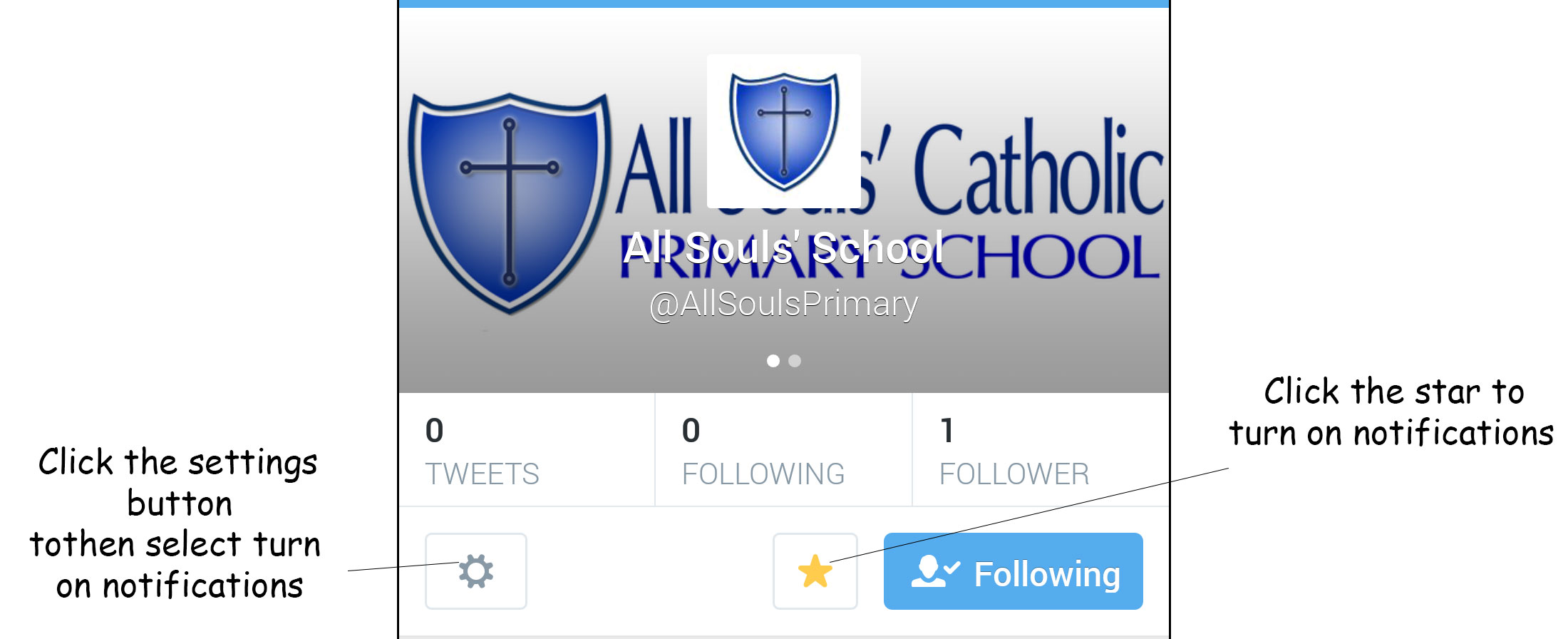
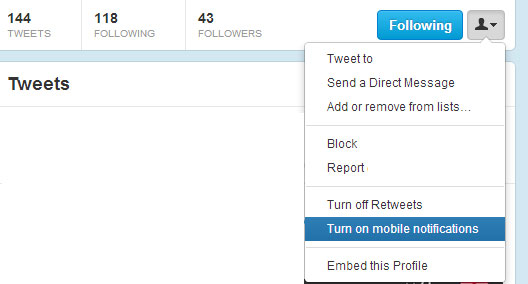
The second way is via your computer, this is also relatively simple. Once you have follow us visit our page and click on the button next to following. From here select turn on mobile notifications.
I hope this explains how to setup twitter and follow us easily. Please pass on the message to other parents that we now have a twitter account and we look forward to tweeting you soon.
